
Report a problem on GitHub
Open an issue in ElBee Player's public repository. Others can see it, add to it and follow the fix. You'll need a free GitHub account.
Installing ElBee Player, answers to common questions, keyboard shortcuts, and a way to reach us.
Click Download for Mac. A disk image called ElBeePlayer-0.31.01.dmg arrives in your Downloads folder.
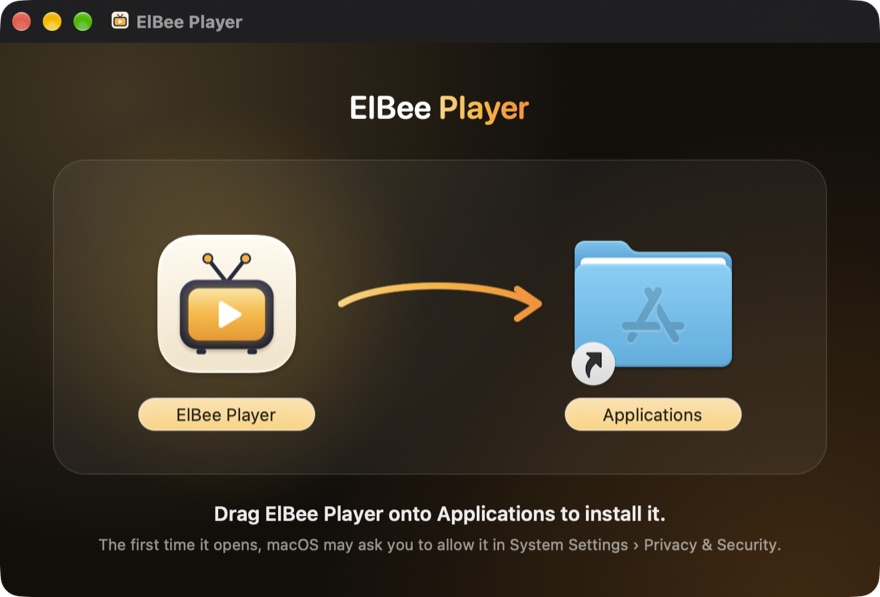
Double-click the disk image. A window opens with ElBee Player and your Applications folder: drag ElBee Player onto Applications. Then eject the disk image (the eject button beside it in Finder's sidebar) and delete the download if you like.
ElBee Player isn't notarised by Apple yet, so the first time you open it macOS says it can't check it. Click Done, then open System Settings › Privacy & Security. Scroll down to the message about ElBee Player, click Open Anyway, and confirm with your Mac's password. Open Anyway appears only after you've tried to open ElBee Player, and for about an hour afterwards.
You only need to do this once. From then on, ElBee Player opens normally and updates itself.
Enter the server address, username and password from your own service. Your password is stored in your Mac's Keychain and is never sent to us.
If an earlier version of ElBee Player won't open, download the latest version. Versions before 0.28.02 relied on a signing certificate that is no longer valid, so macOS stops them opening. 0.28.02 and later are signed differently and don't rely on it. Open the disk image and drag ElBee Player onto Applications, replacing the old copy; your playlists, favourites and settings are kept. The first time you open it, allow it as in step 3. If macOS asks whether ElBee Player can use the sign-in details it saved, enter your Mac's password and click Always Allow.
That's macOS being cautious about a downloaded app. First, delete ElBee Player from Applications, download it again from this page, and follow step 3.
Only for a copy you downloaded from elbeehq.com or GitHub, you can clear the download flag in Terminal. Paste this command, press Return, then open ElBee Player again:
xattr -dr com.apple.quarantine "/Applications/ElBee Player.app"No. ElBee Player is a media player only. It comes with no channels, streams, playlists, programme guides or content of any kind. To watch anything, you sign in with a service you're entitled to use.
No. ElBeeHQ does not provide, sell, recommend, endorse or link to any IPTV service, has no relationship with any of them, and can't help you find one or help with a subscription you have.
Services that let you sign in with a server address, username and password, or that give you an M3U playlist. ElBee Player isn't tied to or endorsed by any particular service, and can't promise that any one works with it.
Yes. ElBee Player is free to download and use for your own personal, non-commercial use, under its licence.
ElBee Player is a general-purpose media player. Whether watching, recording or downloading something is legal depends on where it comes from and on the law where you live. Only use services and content you have the right to use. This isn't legal advice; see Legal & Terms.
ElBee Player isn't notarised by Apple yet, so macOS asks you to allow it the first time. Follow step 3 of the install guide. You only need to do it once.
It's sandboxed, keeps sign-ins in your Mac's Keychain, and connects only to your service, GitHub for updates, devices you cast to, and your own iCloud if you turn on syncing. It isn't notarised by Apple yet, which is why macOS asks you to confirm it once. See Privacy and the install guide.
Choose Add Playlist… (⌘N) from the playlist menu at the foot of the sidebar and pick M3U Playlist. Paste the playlist's web address, or click Choose File… for a playlist file on your Mac. If your service gives you a programme guide address too, add it in the same place.
No, it's a Mac app, for macOS 15 or later. On a phone or tablet, use Send to my Mac on the home page to send yourself the link. To watch on a TV, cast to it from your Mac.
To remove everything ElBee Player has stored, including its saved sign-ins in your Keychain, choose Settings › General › Reset › Erase All Content and Settings. Then quit it and drag ElBee Player from Applications to the Bin. Your recordings and downloads stay in the folders you chose.
No. It's free, and its releases, licence and issue tracker are public on GitHub, but its source code isn't published.
ElBeeHQ, one independent developer. More about who makes it.
ElBee Player checks for updates by itself. Each update is checked against ElBee Player's signing key before it's installed, then the app restarts, keeping your playlists, favourites and settings. You can turn automatic checks off in Settings › General › Software Updates.
Most services allow one stream at a time per account. Watching, the live preview, recording and Multi-View can each need a stream, so starting one may stop another. Your service decides the limit, not ElBee Player.
No. There are no accounts, analytics, advertising or tracking, and your sign-in stays in your Mac's Keychain. See Privacy.
Any Mac with macOS 15 or later, Apple silicon or Intel. The system glass look needs macOS 26, and sharpening needs Apple silicon.
Make sure you're on the latest version (ElBee Player › Check for Updates…), then report it on GitHub or send us a message, saying what happened and your version number (ElBee Player › About ElBee Player). We can't help with problems on your service's side, such as missing channels or an expired subscription.
No questions match that. Try another word, or ask us.
| Shortcut | Action |
|---|---|
| Space | Play or pause |
| ←→ | Skip back or forward |
| ↑↓Return | Move the Live TV spotlight, then play |
| ⌘F | Search |
| ⌘[⌘] | Back or forward |
| ⌘0 | Now Playing |
| ⌘1–⌘8 | Go to a section (Home to Recently Added) |
| ⌘I | Stream diagnostics |
| ⌃⌘[⌃⌘] | Subtitles earlier or later |
| ⌥⌘[⌥⌘] | Sound earlier or later |
| ⌥⌘←⌥⌘→ | Slower or faster (movies and episodes) |
| ⌘←⌘→ | Previous or next channel, station or episode |
| ⌘L | Last watched channel |
| ⌘J | Jump to live |
| ⌘↑⌘↓, ⌥⌘↓ | Volume up or down, mute |
| ⌥⌘S | Save still |
| ⌘R⌥⌘R | Refresh all, refresh category |
| ⌘D | Add to or remove from Favourites (what’s playing) |
| ⌥⌘T⌃⌘S | Hide or show the toolbar, the sidebar |
| ⇧⌘M | Multi-View |
| ⇧⌘K | Manage Categories |
| ⇧⌘R | Series Link (auto-record rules) |
| ⇧⌘P | Choose Playlist |
ElBee Player is made by ElBeeHQ, one independent developer. It's free, with no adverts, accounts or tracking.
Every release is listed in What's New, and the releases, licence and issue tracker are public on GitHub. Questions or ideas? Get in touch.
Found a problem, or have an idea for ElBee Player? There are two ways to tell us. We can't help with channels, subscriptions or accounts from your service, and we never recommend services.
Open an issue in ElBee Player's public repository. Others can see it, add to it and follow the fix. You'll need a free GitHub account.
Use the form below for anything you'd rather not post publicly. We'll reply by email.
Thanks. I read every message and reply to your email as soon as I can.
Open the download and drag ElBee Player onto Applications. The first time you open it, macOS asks you to confirm: open System Settings › Privacy & Security and click Open Anyway. You only do this once.